First Contact with Software: Overview and Organization
The RustiQ IOT stack is primarily organized through its file system structure, with all core commands and implementations located in the /node directory. This organization provides a clear separation between operating system functionalities and RustiQ IOT-specific features.
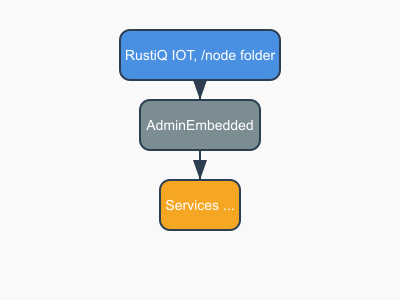
Physical files and /node Folder Structure
The main node folder is organized as follows:
node/
├── adminembedded     # Admin and bootstrap process, embedded management interface
├── apps/             # Application services and user-developed functionalities
    ├── contents/     # Per-application stored content
    ├── status/       # Status information for applications
    ├── bundled_factory_apps/  # Pre-installed factory applications
    └── deployed_applications/  # Deployed application instances
Each directory serves a specific purpose:
adminembedded: Contains the web-based administration interface and embedded management tools
apps: Houses all user services and applications, each in its own subdirectory
contents: Stores application-specific data and content
status: Status information for applications, organized by application
bundled_factory_apps: Pre-installed factory applications
deployed_applications: Contains running application instances
Process and Service-Based Architecture
The AdminEmbedded process serves as the central component of the architecture. Designed for 100% uptime, it operates as the primary process that remains constantly active. This reliability is achieved through minimal feature implementation and reliance on core operating system primitives.
The adminembedded process runs with elevated operating system privileges, enabling it to manage and sandbox other processes within the system.
All inter-process communication is handled through networked RPC services on TCP port 8003. This provides a unified ADMIN scripting API for managing core device administration.

All other modules and applications are managed by the adminembedded process and communicate with it through the admin API over the TCP channel.
The Admin API facilitates inter-process communication between all applications and modules, providing:
One-to-One communication (RPC calls)
One-to-Many communication (Events)
For more information about the Admin API, please refer to the Developer Guide chapter.
Admin API
Admin API is ne new concept from RustiQ IOT stack and ease a lot the usage, debugging, administration, without haveing to rely on installed elements or plateform specific elements.
Admin API is built on top of a small interpreter and provide a clear separation between the OS and the device module’s functionnality. This clearly help standardize the commands and provided services.
example of commands that are part of the Admin API :
start_app('only_wifi-1.0')
Admin API for Communicating with other modules
Communication is centralized by the Admin API, that provide some functionnalities for handling service access and usage.
As the core adminembedded daemon is always up, one can call a function throught the call_service core function.